Showing posts with label math. Show all posts

Wednesday, June 17, 2015

Review: CTC Math

For better or worse, math is one of those subjects you can never get away from.  It’s not like the lifecycle of a butterfly, which you can cover once and never study again (or maybe skip entirely). You start with counting blocks and continue throughout a student’s education. And for some mothers, this can be intimidating because it wasn’t their best subject.  When you can’t teach what you never learned yourself, what are you to do?  You may need to turn to outside help like CTC Math.   We’ve been reviewing their 12 Month Family Plan this summer.  While they have courses to cover everything from kindergarten math up to Calculus, Fritz has been trying to prevent the summer brain drain by going through their Algebra lessons. 

When you log on to CTC Math you may notice that you’re redirected to a website with an .au extension~~that stands for Australia!  Yes, when my son was watching his online lessons it sounded like he was being taught by the Man From Snowy River.  Who knows, he might have been more engaged just by listening to that accent.  I also noticed on login, that we were receiving the United States curriculum.  Although it didn’t affect anything we covered, I’m assuming that means some lessons would include American currency or units of measure, but also that there would be other curricula available if you lived in another part of the world.
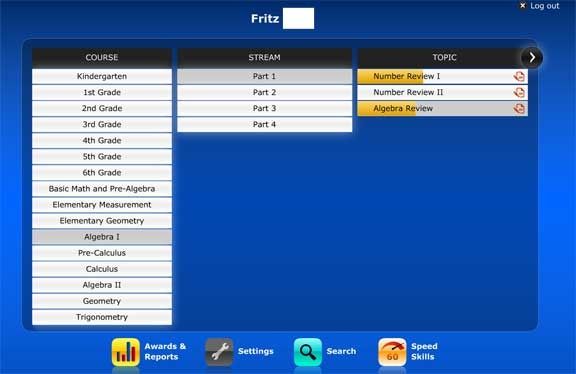
The start-up screen gives the student access to all the levels on the left hand side of the screen.  You can narrow in on your course of study by choosing a stream and then topic (the gold bar in the topic shows the progress you’ve made in that section).
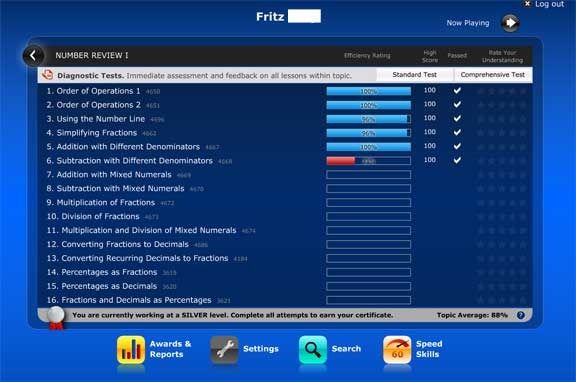
When you select a topic, you move to a new screen with the individual lessons.  If you’re not sure where to begin, there is a diagnostic test (gray bar at the top of the list).  You can get immediate feedback on what your student already knows and what should be reviewed (or learned for the first time).  I didn’t notice this test at first and had Fritz start at the beginning~~he really could have jumped ahead because he’s already mastered the order of operations. 
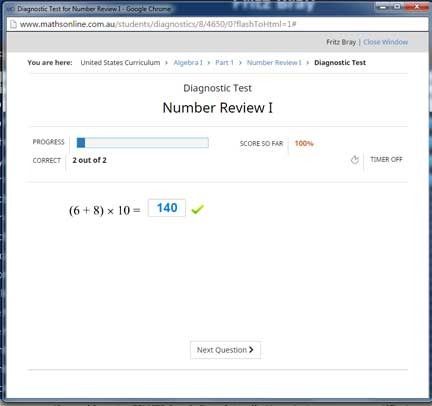
I find it interesting that the test had you type in the numbers (with fractions they give you two spaces to fill for numerator and denominator) because when it came time for the worksheets they use an entirely different format for submitting answers/grading.  I would print out a page for Fritz with problems to solve and at the bottom of the page was a list of possible answers with a letter assigned to each.  After completing the paper he’d return to the website where he’d click on Enter Results.  If he’d missed any, he could click on view solutions where he’d see the correct answers, but nothing on how that answer has reached.
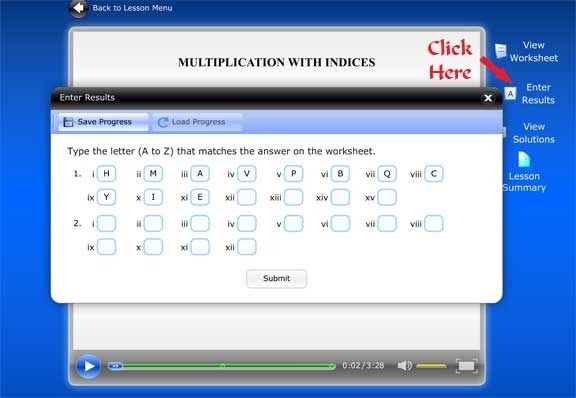
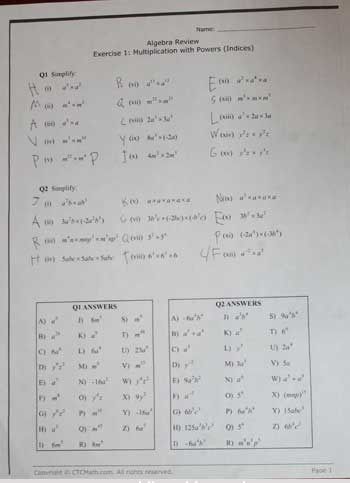


I’m still on the fence about this “answer key” method.  Yes, it’s better than multiple choice where a student may have a one out of four or five chance to guess at the right answer.  As far as I can tell each of the answers is used only once so a kid could leave questions he was unsure of until the end to improve his odds of guessing correctly.  Of course since algebra involves letters and the worksheets don’t always use the same letter for the unknown, you could also eliminate some answers that way.  I did see some answers that were designed red herrings, that is, answers a student would get if they made a common mistake like switching positive to negative.  Still, if CTC has the capability to let students just type in answers I think that would be the best way to see what they know or don’t know.
 
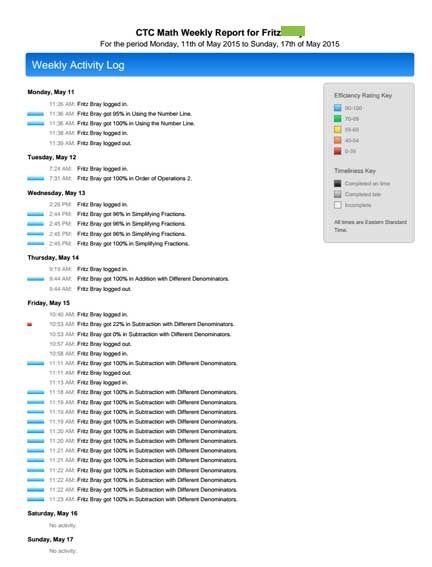
To that end, I received a weekly report via email that showed Fritz’s progress.  It let me know how long he’d worked on math and his grades.  You may notice the small red dot on the report or the red line on the screenshot of the lesson topics.  On that particular day I’d called Fritz during math time to come see a mama fox and her kit running through our back yard. He missed seeing the pair and blamed it on math.  He had been entering his answers and when he returned to the computer he hit submit in a fit of anger.  When he’d calmed down he tried to return to the exercise and finish submitting his answers, but the damage was done. He’s initial score was 22 percent.  I’ve found no way for a parent to “reset” the system.  He could repeat the activity over and over and raise his score, but it’s weighted to the first submission and he’ll never get to 100.  So that day Fritz learned a life lesson (repercussions of acting in anger) as well as algebra~~Lesson learned.   I do think a parent reset might be a good feature to add, especially given that this program is delivered via the internet.  I don’t know what would happen to a students records if a storm or something else interrupted the connection during a lesson.


 
Still, I think we’ll keep using CTC through the summer.  The lessons are relatively short (around 5 minutes) and the teacher is pleasant to listen to.


CTCmath Review

Monday, May 4, 2015

Review: A+ Tutorsoft

For the past several weeks Schnickelfritz has been  learning his algebra via the A+ Interactive Math website.  Algebra 1 is currently the highest level currently offered in their Family Math Package (they are working on additional high school levels)
WHAT WE RECEIVED:

A+ Interactive Math is a subscription based service.  They offer math instruction for varying lengths of time and for one to ten students. The lessons for A+ must be viewed online.  There are no captions for the hearing impaired, but it is possible to click the text button and read a synopsis of the lesson (it is not word for word and the ones we viewed did not include the text for sample problems).  At the end of each lesson, you may take an interactive quiz.  Corresponding to each lesson are worksheets and exams which may be done online or offline.

How We Used It:

Schnickelfritz would watch the lesson presentation online and take the interactive quiz immediately after.  He usually reported his quiz score to me and being so fresh in his mind he almost always got an outstanding score.  On several occasions he mentioned that there was only one question so it was really a case of pass or fail.

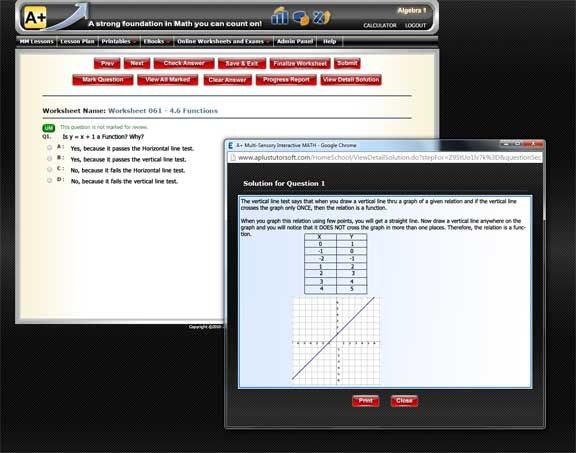
We don’t have much space at our computer desk, so rather than try and solve worksheets online I would print out the worksheets and Fritz could have all the space he needed for writing and scratch paper at the dining table. Then he could return to the computer and click the appropriate radio button for the multiple choice questions.  The printed worksheet and the online worksheet had problems listed in different orders so he might have to search his paper for the same question (I also noted the algebraic equations would appear slightly different—his paper might say x/2 and the online question might show 1/2x, which kept him on his toes).  I had the settings for the online worksheet set up so he could see the correct answer and also view a detailed solution if he had gotten the problem wrong.  In this way he was really using the online worksheet to grade his own paper (and automatically record his score).  If your student is working solely online you can hide the solutions to prevent cheating.  I could also have graded his paper and entered his score manually, but I think he was able to learn a great deal from grading his own mistakes.  I printed out the exams and we treated them in a similar fashion.

One nice this about the printed work was that most questions asked him to show his work or explain his answers.  Being able to explain why you did the steps you did is a great way to prove mastery of a subject. 

What we thought of it:

The math and the teachings were all sound.  There are no games or gimmicks (at least not at this level, we did not try levels intended for younger students). Our complaints had more to do with the execution. For example, the recordings of the lessons weren’t very crisp~~ there was static or hissing when speakers made “S” sounds.  If it were a radio broadcast, I’d say we needed to adjust the fine tuning.  I also wish the materials were organized so that you could access everything for one lesson from the same screen—multi-media lesson, worksheets, exams.  Instead you would have to start at the top and drill your way down for each type of material e.g. choosing MM lessons, then opening folder 4, then choosing lesson 4.4 Equations as Relations.  Then when I wanted the exam I would choose the exam tab, folder number 4 and lesson 4.4 again.  What made things worse was the worksheets weren’t numbered like the lessons and I’d have to hover over each one to find the one that corresponded with our lesson.

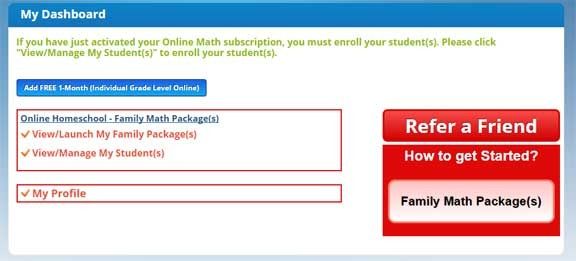
Similarly, I had to go to very different areas to set up my student.  From my dashboard I was able to set his level of lessons from the second option on the screen (see above). However, if I wanted to change the settings so Fritz could see detailed solutions I would have to Launch my Family Package and then choose the Admin Panel tab from there.

A+ Tutorsoft is running a 2-week 40% to 50% off sale on both “Family Math Packages” and “Adaptive Placement Testing w/ Lessons” programs from  5/4/2015 to 5/18/2015

If the mean time you can check out all these freebies to see if their programs would be a good fit for your family…

Free Math Placement Test: http://www.aplustutorsoft.com/get-free-homeschool-math-curriculum-placement-test-online.jsp
Free Family Math Packages: http://www.aplustutorsoft.com/get-free-homeschool-math-curriculum-program-package-online.jsp

Free Software Download:  http://www.aplustutorsoft.com/get-free-homeschool-math-curriculum-software.jsp
Free Single Grade Level: http://www.aplustutorsoft.com/get-free-homeschool-math-curriculum-program-online.jsp
Free eBook: http://www.aplustutorsoft.com/get-free-homeschool-math-curriculum-ebook.jsp

Additional Information:
Top 12 Reasons to use "Adaptive Placement Test & Lessons" program:
http://www.aplushomeschool.com/2015/03/top-12-reasons-to-use-adaptive-math-placement-test.html
Top 12 Reasons to use "Family Math package" program: http://www.aplushomeschool.com/2015/03/top-12-reasons-to-use-family-math-packages.html

A+ Interactive Math Review
/

Sunday, August 24, 2014

Review: UberSmart Math Facts

Now is the time when all teachers are testing to see just how severe the “brain drain” was over summer vacation.  It’s inevitable that some of what was learned last year must be learned again (or at least reviewed).  Let’s take math facts for example,  the answers just don’t come as quickly as they did last spring.  It was a great time to review UberSmart Math FactsPLEASE NOTE: This downloadable program from UberSmart Software can only be used with Windows (versions 7,8, XP and Vista).  You have permission to run the program on as many computers as you want within your home (great for several kids).  As a teacher, you would then have to go to each computer to check students’ progress rather than having everything in one database if using a shared computer.
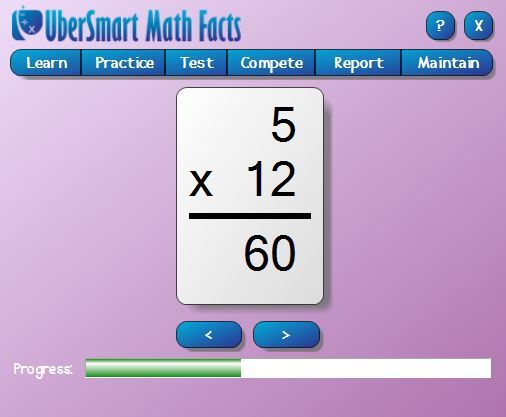
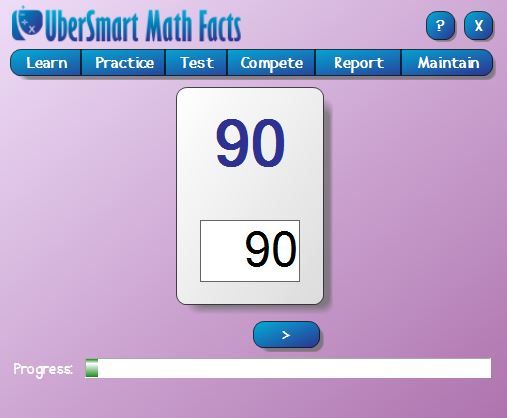
If you’re not sure where to begin, these is an assessment test under the Test menu.  It would then direct you to the lessons in the Learning Mode.  The flash card appears on the screen and the student is only required to say the number (aloud or in their head) and then click the Show button to reveal the answer.  He would then click the > button to move to the next problem.  (Update: you may also show the answer and advance by using the Enter key). A progress bar runs across the bottom of the window.

The student then moves to the Practice level.  You may go straight to the flashcards or choose a keyboard entry lesson if the student is not used to typing answers into the computer. 

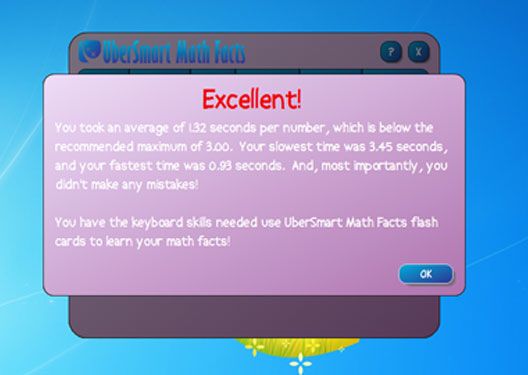
I let Schnickelfritz use the 10-key pad for answering (he was quick to discover the Enter key was a much more efficient means of advancing than the mouse).  He was well under the three seconds per answer maximum allowed by UberSmart (gets that from his accountant Mama). The applause and “Excellent!” banner were appreciated.

We moved on to the practice level…Fritz chose which skill he wanted to work on (add, subtract, multiply, or divide) first. Then he could decide to focus on just one set of math facts, the twelves or sevens for example, or the whole set (from 0 to 12) randomly selected.  Since this was just an exercise in getting up to speed rather than learning for the first time we jumped right into the All set.  Be aware, this makes for a very long session.  I tried to count problems while Fritz answered them and I was up to around 150.  For younger students you may want to stick to just one set of facts.

Fritz finished at 98 percent (it’s his best subject) and was told he was ready for the Mastery Test.  Again he had the option of picking a single set or doing all the math facts at once (his choice).  We turned off the option to show a time bar along with the progress bar as this sometimes distracts my son.

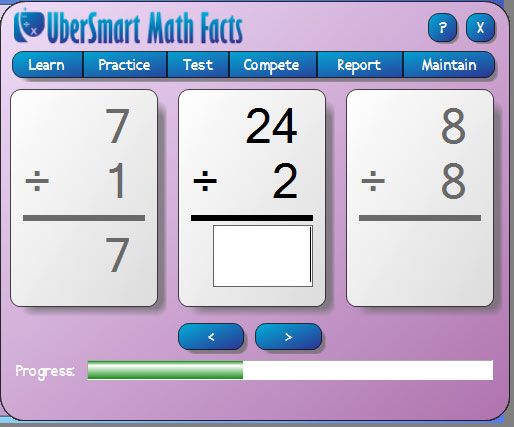
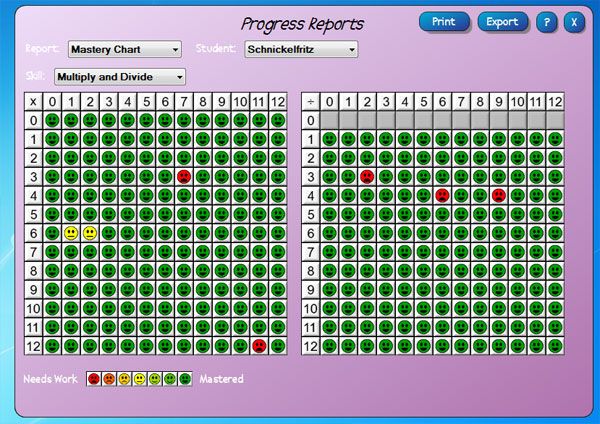
This time three flash cards appear on the screen at once and you’re supposed to be answering the middle one.  When you hit the enter key everything scrolls to the left.  I made the mistake of asking Fritz to take a screenshot during his test and it threw him off so he was answering the newest problem to appear on screen (the one to the right) rather than the center problem.  The test level doesn’t give you the immediate “Correct” that the practice level does and if I hadn’t been sitting next to him watching his answers he would have gotten a lot more problems incorrect.  That’s why you’ll see a few red faces on his progress chart.

For students that don’t like math, there’s really not much here to coax and cajole them to drill – no rewards or fun games.  It’s really just electronic flash cards.  If you’ve got a kid with a real competitive streak they can “compete” with the tests, exporting their scores to see how they rank against others. 

As a parent, I could monitor Fritz’s progress through the report tab.  I could look at his original Assessment, Mastery Progress, Mastery Chart (see above),  Grade Book, and Competition. This area doesn’t seem to be password protected so I think that kids would be able to check on their own progress (or brothers and sisters?) by selecting a name from the drop down menu.  If I was confused about the program, each screen has a ? button which brings up a 32 pages PDF manual (my version has several pages that say “under construction” though).

UberSmart Math Facts is targeted to K-6 graders.  Younger students work with dots rather than number symbols. The software may be purchased and downloaded for $24.95.


Click to read Crew Reviews
 

Monday, March 10, 2014

Review: ScienceandMath.com Algebra Tutor DVD

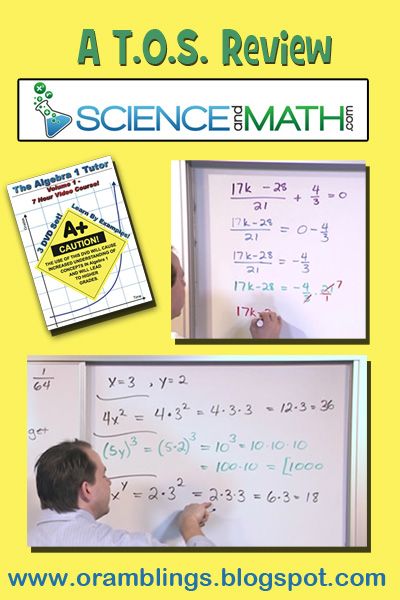
Algebra TutorThis is not our first review of DVD’s from ScienceandMath.comIn 2010 we used The Basic Math Word Problem Tutor and in 2012 we used  Amazing Science.   Now, another two years later we are viewing Algebra 1 Tutor: Volume 1 with its companion Fractions Thru Algebra Companion Worksheet CD.

Before we begin, let me be candid that math comes very easy to my son—and he loves doing it.  He’s only 11 (so he would be in 5th grade in a regular school setting), but he’s already doing algebra work.  Watching someone do math is entertainment in our house – yes, he pulls out math videos to watch during free time.  I know a lot of you reading this post will be desperate to find something to help math concepts sink into your kids’ heads and wondering whether or not they will even be willing to sit down and watch 7+ hours of math tutorials.  I will try to cover your concerns in my comments, just understand that’s not how we approached the DVD’s in our home.


The Algebra 1 Tutor ($26.99 DVD, $23.99 download) is geared towards  7th grade and up, but you’ll know if your child is ready for upper level math at a younger age.  I would even venture to say that the first DVD (and part of the second) could be labeled Pre-Algebra.  The three DVD’s and their topics are:

Algebra TutorDisk 1
Sect 1 - Real Numbers And Their Graphs (53:33): Math terms  are defined and examples given for Natural Numbers, Whole Numbers, Integers, Rational Numbers, Irrational Numbers, Real Numbers, Prime Numbers, Even and Odd, symbols (=, <, >) and variables.  The final 13 minutes cover marking number lines.
Sect 2 - Review of Fractions (52:44):  After explaining how to simplify fractions, sample after sample is given on how to Multiply, Divide, Add & Subtract fractions.  The final 8 minutes deals with mixed and improper fractions.
Sect 3 - Exponents and Order of Operations [View a Sample] (39:40):  The concepts of Exponents and Factors are explained and then many mathematical expressions are solved while covering the order of operations.

Disk 2
Sect 4 - Adding and Subtracting Real Numbers (1:05:11): A brief listing of the rules of signs when adding and subtracting positive and negative numbers and then example after example getting progressively harder.
Sect 5 - Multiplying and Dividing Real Numbers (36:56): The rules of signs for multiplying and dividing positive numbers and negative numbers and then examples.
Sect 6 - Algebraic Expressions
(19:04):

Disk 3
Sect 7 - Properties of Real Numbers (39:40):  Properties covered are Closure, Commutative, Associative and Distributive
Sect 8 - Introduction to Equations [
View a Sample] (42:09): In the  first third of this section, the speaker writes equations and gives a value for the variable, then he plugs in the number to see if the equation is true or false.  The last two thirds of the section involves the traditional solving for “X” you expect in algebra.
Sect 9 - Solving More Equations (35:27):  More solving for the unknown, but these problems require more than one step to isolate the variable.
Sect 10 - Simplifying Expressions to Solve Equations (47:34):
After a long explanation that simplification can only occur if the terms in the expression have the same variable, the speaker proceeds to simplify and use distribution in increasingly harder algebraic expressions.

 I received a download version ($21.99) of the Companion Worksheets but the website also sells a CD for $24.99.  The PDF files are organized and labeled to correspond with the sections or the DVD.  For example Section 2 on Fractions has three Worksheet files Labeled 2a-2c.  I printed out the pages of problems but let my son look on the computer screen to view the solution pages.


How I used with my son:

Most of the concepts except the very advanced equations on Disk 3 were just review for my Schnickelfritz.  I let him watch the sections in any order he pleased.  I would pause the DVD after each problem had been written on the white board and ask him to solve it.  Any hesitation or wrong answer and we would have to watch the speaker work through the problem. (Of course this means I have to be quick to solve the problems too—but math is also my strong suit).  Otherwise he was allowed to fast forward  to the next problemWe could still watch the the speaker write out the solution, but we skipped over a lot of his reiteration.   If you have a student that struggles with a concept, he or she may benefit from hearing facts repeated or explained in several different ways—one of them may just penetrate to the brain.  The day after finishing the section on the video, Fritz would work through the problems in the corresponding Companion Worksheet.


What We Liked:

  • The student is urged to to write out step by step solutions to the problems and not skip steps or solve them in his head.  My Schnickelfritz  is always trying to work problems in his head as he’s loathe to put pencil to paper, but then he can’t review and find errors.
  • There are dozens of examples of solving problems—starting with simple equations you might see in second grade and getting increasingly harder (adding parentheses and order of operations) and finally proceeding to the introduction of variables (making it look like an algebra problem).  It’s done in baby steps, just introducing one new concept at a time to help struggling students feel comfortable.
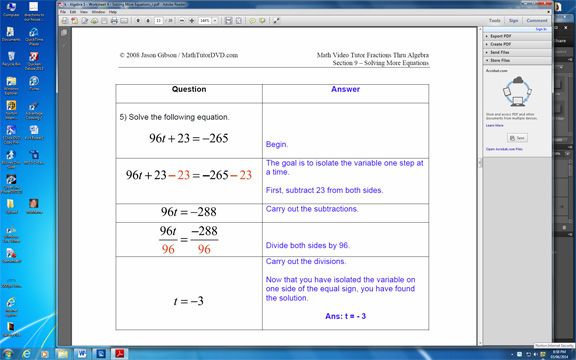
  • The Worksheet solution pages are divided into to sides—one side shows step by step how to solve the problem and the other side gives more detail about what is being done or explains why the step is necessary.  If you’re student got the wrong answer let them read the solution for themselves to see why or where they went wrong.

Algerba Tutor Worksheet solution


What we’d like to change:

  • I understand that the speaker was often trying to make learning as simple as possible for struggling learners, but definitions need to be accurate and an explanation of “why” is as important as showing “how”
  1. The definition for a fraction was “to mathematically express something less than one.”  In reality, that should be something less than “one whole unit.”  The number (–15) is less than one but it isn’t a fraction.  I’m being nit-picky, but  this is directed at kids already struggling with math.
  2. In one addition problem the speaker says “We have to start inside the parentheses or we’ll get the wrong answer.”  It would have been more accurate to say we need to get in the habit of working in the parentheses first because the sample problem he was working on was a perfect example of the associative property of addition and would work out no matter which way we solved it.
  3. The teaching of dividing fractions follows the old school rhyme “Don’t ask why, just flip and multiply.”  It’s fine to solve problems this way but there should be an explanation as to why this works.
  • I wish the sections were further divided into subsections.  My son isn’t used to 50+ minutes of math lesson at a time.  Sub-chapters would make it easier for us to find our place the following day.  You may also find that your student only needs review of the term Prime in the middle of the 53 minutes of Real Numbers and it would require a lot of fast scanning to get to it. 
  • Inclusion of Subtitles for the hearing impaired.  The speaker does a lot of writing on the white board and you can’t read lips looking at the back of his head. (To be fair, a lot of homeschool DVD’s don’t include closed captions—not just this title).

The Final Word

If you have a visual learner that benefits from watching example after example of math problems being solved then this DVD set may be beneficial.  The price works out to less than $4 per hour and you’ll never find a tutor for that rate.  

You may click the links to read my review of The Basic Math Word Problem Tutor or Amazing Science or click the graphic below to see what others think of the ScienceandMath.com DVD’s.

 
Click to read Crew Reviews

Monday, September 30, 2013

TOS Review: Videotext

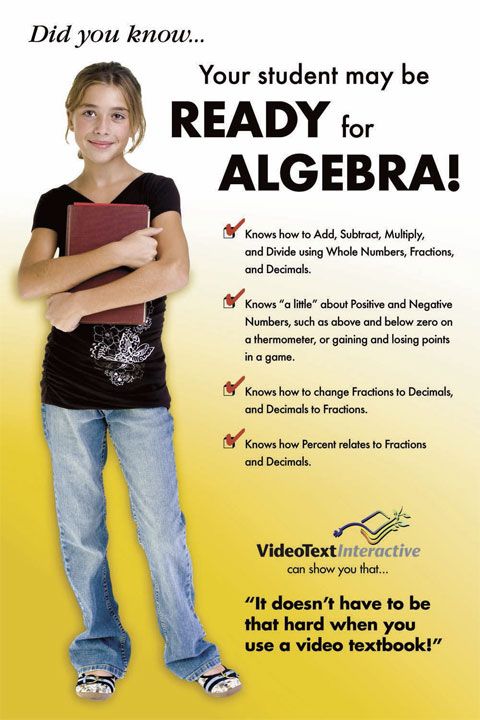
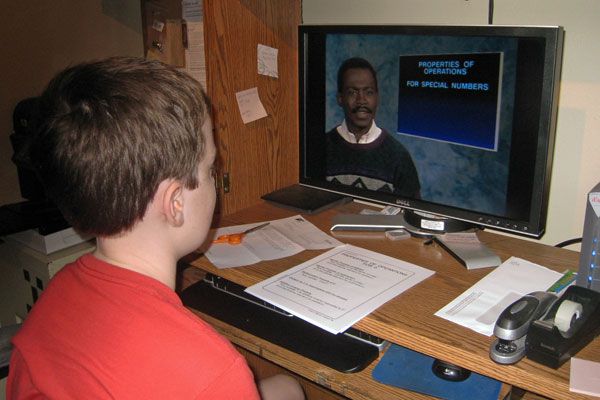
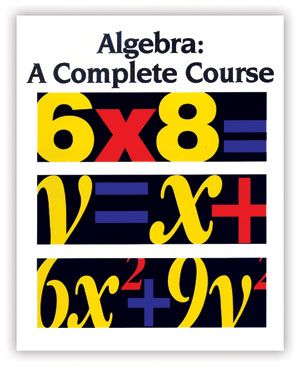
I knew I had a math whiz on my hands when my five year old son started telling me how many miles were left on car trips because he subtracted the mile markers from our exit number (3 digit numbers IN HIS HEAD).  That was five years ago and things haven’t changed.  He’s been tearing through math books like Grant Took Richmond.  He loves math and for that I am grateful, but I’ve been searching for something to challenge him.   Then we learned about  VideoText Interactive and I thought “maybe this is it.”  Their Algebra: A Complete Course covers all the material traditionally taught in Pre-Algebra, Algebra 1, and Algebra 2.  The pacing of the course can range from 1 to 3 years (progress is based on mastery).  Schnickelfritz is younger than the suggested grade level (Gr. 8 and up)  but he was more than ready.  You may be surprised to learn your kids are ready too!  VideoText offers these guidelines…

We selected the 2-year pace although we’re prepared to slow down if things do finally get challenging.  Under this plan a lesson would take two days.  Here are the details.

I began each day by printing out the Course Notes and WorkText for the lesson.   Fritz  would watch a 5-10 video lesson.

Because Fritz cannot interact with the teacher on the screen, VideoText recommends that  I, as the parent, watch with him and pause the video “every 15-20 seconds” to engage him in discussion.  That interval of time was so short as to be annoying but we did try to pause and talk 2-3 times per lesson.  Fritz had the Course Notes in front of him as students are not supposed to take their own notes during the lesson.  This program is clearly meant for students ready to buckle down and be serious about math—there are no jokes, cartoons, games, or rewards for completion, just a teacher and power point presentation.

After the video we left the computer for the dining table where we could read through the WorkTest – more thorough than the notes and often with completed problems to study.  When he was comfortable he could proceed to answer the 5-10 problems included in the lesson.  Then he returned to the computer where he checked his own answers.  If he found any errors he would compare his work to the solution to see where he’d erred and he had to explain the mistake to me (error analysis being part of mastering the concept). 

The following day I would print out and give him the quiz on the prior day’s lesson.  (We did run into several instances where two or more lessons had been grouped together so he watched videos several days in a row before taking a combined quiz.)  This delay before testing meant he couldn’t just rely on short term memory to solve his work.   I would grade the quiz and we would do the error analysis together if necessary.  If he had done really poorly we could have repeated the lesson and done a B version of the quiz.


I have to say as a math whiz myself, I was impressed that Fritz was learning math theory—not just how to solve problems.   In the first 3 lessons he learned to see the different symbols of math as a components of a language:  numbers were nouns,  operation symbols were verbs,  the x’s and y’s common in algebra were the pronouns.  They could be combined to form phrases and sentences (sentences have a relationship symbol like the = sign).   And we translated problems from English to Math language.  Since then we’ve been working through lessons to further investigate number, operation, and relational symbols.  As I look ahead, we’ll go nearly the first quarter without a lesson “this is how you solve for X” which is basically what I recall algebra lessons to be about.

We’ve been using the online lessons for five weeks now and I asked Schnickelfrtiz if he wanted to continue with it or go back to our old math curriculum.  He picked the VideoText, as sound a recommendation as I can come up with. 

The VideoText site is best supported by Internet Explorer, Google Chrome and Mozilla Firefox for PC’s and Safari or Google Chrome for Mac’s.

The lessons are done by streaming video.  Our internet service is via satellite  so our download speeds could vary greatly, but we only had the videos pause once or twice during the review period.  For the month we had slightly over 5G of downloaded data –only a portion were the videos (for those of us concerned with download limitations).

The Pricing for all six modules of the online version of Algebra: A Complete Course is $299.  This gives you a 2 student licenses and each student will have access for 3 years after activation.  The Program is also available on DVD for $529.  If you’re not sure if this will work with your child, you may purchase Module A online for $59.  You may also login as a guest and access some sample lessons and demonstrations.


Photobucket

Don't miss a thing! Subscribe to Ozark Ramblings and get my posts in your inbox.

Wednesday, March 13, 2013

Shh, Don't tell them they're learning


It's Day 3 of our 5 Days of Teaching Creatively and today we tackle Toys, Games & Puzzles.  When people have asked me how to get started in home schooling I've always answered "First teach your kids that learning can be fun."  After all, if you've got an enthusiastic student it makes the day go more smoothly, even if they don't like every subject.  To that end, I've always tried to incorporate games or songs where memorizing is involved.  It's like hiding the medicine in a spoonful of sugar,  they're drilling facts and often don't recognize it. 

Geography: This year Schnickelfritz is taking Mapping the World by Heart at co-op class.  We have to drill countries on all the continents at home so that he's ready for the weekly quizzes.  Fortunately for us his grandparents got him Where in the World? for a birthday present.
In the box a three two-sided cardboard maps (one for each continent except Antarctica ), a cardboard spinner base (the other side shows the seas and oceans of the world), and playing cards for every country in the world.  The cards a color coded by continent and each has a number so you can find it on the corresponding continent map. 

Without even playing the game we can practice identifying countries.  I give Schnickelfritz the name of the country and he looks on the map and tell me what number he thinks it is.  Then I  look at the card and see if he's correct. (Truthfully, I should be learning this myself).  I can shuffle the cards so I know he's not memorizing a pattern, like the geography songs they learn in class.

Of course, it's really the games that keep learning fun and Where in the World has instructions for six games of all learning levels.  We've only played the first two.

1. Crazy Countries--Like Crazy Eights, you're trying to discard your entire hand.  You may play a card if it matches the color (continents) or number of the previously played card.  This is for a young child  just becoming familiar with the countries so you can help the pronounce the name as they play the card.

2. Crazy Countries 2 -- You're still trying to match the previously played card but now you're looking at the other listed facts: Major Religion, Exports, Imports, Languages, or Population range.

The higher levels are more about correctly memorizing the Exports, Imports, Literacy rates and other facts of the countries rather than just be exposed to them and I'm not so concerned about that for an elementary student.  Stay tuned next week when we see how Schnickelfritz does on his memorized map of the world.

Math:  (This is taken from a previous post, Math Facts of Fun?  Check it out if you've got younger students to read about Jelly Beans and Knock-Out.)

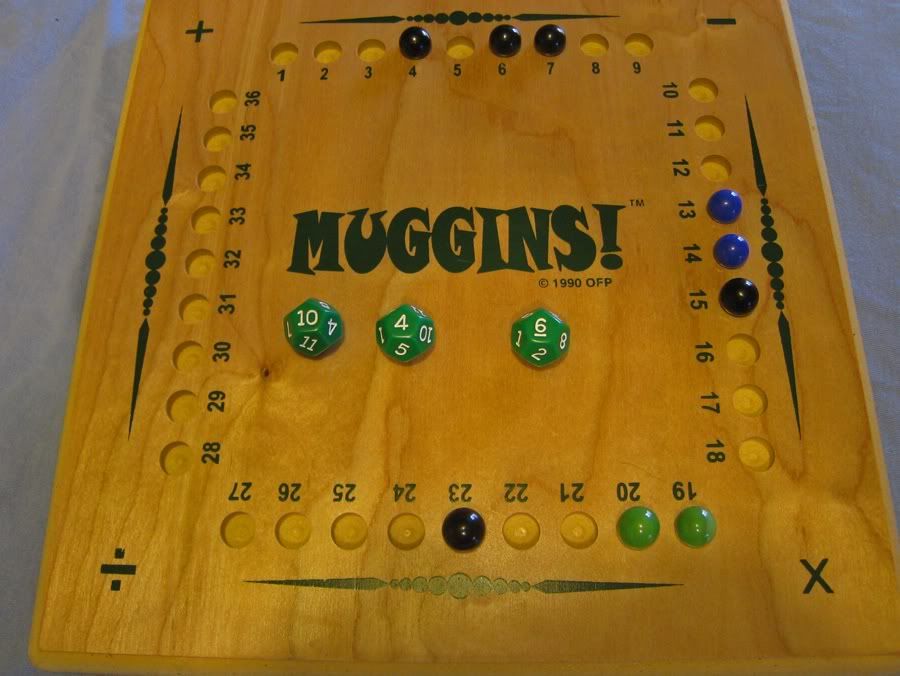
Muggins is still one of our favorite games and we don't even notice that we're drilling math functions.  The board has holes numbered 1 to 36 around the four sides and uses three dice.  The player scores points for every marble on the board, but there are bonuses for creating a run of 2 or more of your marbles in a row.


In its easiest level, Muggins can still be a game of just addition and subtraction.  By using the 12-sided dice included with the game it's possible to capture all 36  numbers.  Here it's black's turn and I've rolled a 10, 4 and 6.  The 20 (10 + 4+ 6) is already taken by green.  I could make a run of three by capturing the 8 (10 + 4 - 6) or I could stop blue's run by taking 12 (10+6-4).

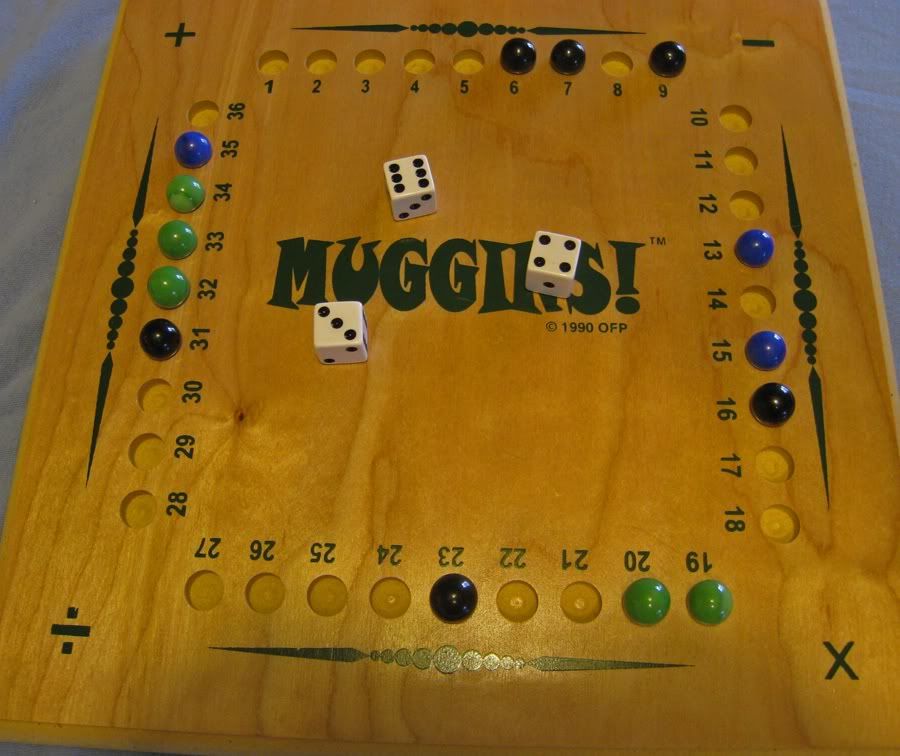
At the next level of the game we use three regular dice but any of the four math functions.  You either add, subtract, multiply or divide two dice to get a new number and then add, subtract, multiply, or divide that number by the face value of the third die.  You can see where the possible choices of marble placement expand dramatically.
Here are just a few options (assuming I'm blue) with a 3, 4 and 6 :

3 + 4 + 6 = 13,  already occupied
3 + 4 - 6 = 1,  available but it doesn't make a run or block anyone else
3 + 6 - 4 = 5,  this would put an end to one side of black's run
(6*4)/3 = 8,  this would keep black from forming a 4 marble run
6*3 - 4 = 14, this would give blue a run of 3

As the board begins to fill it becomes harder and harder to find numbers to capture.  I can almost see Fritz's gears churning in his brain as he tries to manipulate the numbers to come up with an open solution.  In the official rules of Muggins you are allowed to "bluff," that is try to get away with placing a marble somewhere that you can't reach mathematically.  If you get caught, that marble is removed.  If you are challenged and can explain your calculations you may remove one of the challenger's marbles.  (When we're playing for school purposes, we always "show our work" and explain our calculations so no bluffing allowed).  There's an even higher level of game play where you use two dice as noting place value.  In our sample game I could use the 3 and 6 as 36 and divide by 4 to make 9 (but that's already taken).  I love the age range for Muggins-- 8 to Nuclear Physicist.

I'm Thinking of a Person:

Of course you don't have to buy anything to come up with games for school.  We play this version of 20 Questions in the car and even while waiting in line for the roller coaster.  One person will announce "I'm thinking of a ________ person. " The blank being filled in by one of our school subjects.  It could be a historical person, a Biblical person, or a fictional person from a book we've read.  The guesser may only ask "Yes and No" questions to narrow down the field.  We play until the correct guess is made whether it's more or less than 20 questions.  We're reviewing fact as we form the questions, for example...

Did this person live in the 18th century?
Did this person write a book of the Bible?

It always tickles me that we can play with games and puzzles and log it as school hours.  The possibilities here are endless so you'll want to be sure and visit some of these other blogs and see what they have to share.  And don't forget to check out the 5 Days of Teaching Creatively Giveaway.

Monday, January 14, 2013

It's Math-magical!

Welcome to Week 2 of the Virtual Curriculum Fair  Discovering Patterns: Mathematics, Logic, and Science.  Last year I shared some of our favorite math games and if you've never heard of the company, you should really read about Muggins Math.  (That's Muggins, not muggles--this has nothing to do with Harry Potter).   The point of the the games is to help kids have fun while drilling math facts--it is one of those core subjects that we can't avoid.  Is there a way though,  to help kids develop a desire to learn math or practice math in the first place?  After all no kids is going to buy the argument that someday you may be working in a store and the computers go down and you have to count change on your own (this did happen to me once as the purchaser, I had to show the cashier how to add up from the sales total to the $20 I'd given her). So how's this for a carrot to dangle in front of their little noses: you can use math to amaze and delight friends and family?

What kids aren't fascinated by magic at some point in their lives (I think it's a required phase, like dinosaurs). There's actually a lot of math that goes into magic tricks, especially the ones that appear to be mind reading.  The math manipulates you to turn to a certain page in a book or end a calculation by coming up with your age or house number.  My Schnickelfritz is in that magic phase of life (he got called up on stage to help a magician in Branson and attended magic camp last summer).   I've found several resources that combine math and magic.  PLEASE NOTE:  Usually magicians never tell secrets and I am not sharing any secrets from purchased magic books or tricks. All the material I'm using comes from math books, not magic books.


Math-A-Magic: Number Tricks for Magicians by Laurence B. White 

This book contains 21 tricks.  Each gives an overview of what should happen when performing the trick, how to do it, and the Math-a-Magic secret.  The last section gives the math principle that allows the trick to work (which, math geek that I am, is the best part).   The book is geared to ages 9 and above, but some of the tricks only require counting so even younger kids could get involved.  Here's a favorite:

Super Memory

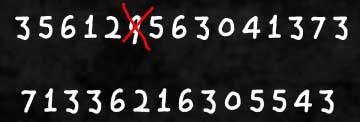
The Trick:  Give someone a piece of paper and ask them to write down  a long number--say 15 digits.  Ask her to say each digit allowed because you're going to "memorize it."   When she's done ask her to cross out one number and then rearrange all the others into a 14 digit number.  Have her read the each digit of the new number.  Your magician's patter is that you have memorized both numbers and are comparing the two and will be able to tell her which number was crossed out.


How to Do It:   When the person is reciting each number you must add them up in your head.  In our example the 15 digits add up to 58 (this is the number you need to remember), when one digit is removed the new sum is 49.  Now all you have to do is subtract 49 from 58 and you know the missing digit was 9. 

Math-a-Magic Secret:  When most people will see only a long, hard-to-remember number.  You've misdirected them by saying you're memorizing it when all you're doing is adding and subtracting.


Mastering Math through Magic by Mary Lombardo

There are actually 3 books in this series geared towards grades 2-3, 4-6, and 6-8 (we have the middle one).    The book is actually written to teachers so it goes into a little detail about objectives, correlation with National Math standards, etc.   The math requirements are addition (with carrying), subtraction (with borrowing), multiplying and dividing.  The 30+ tricks are divided into categories like Calendar Capers, Dice Doings, Money Madness.  Again you always get a step-by-step run through, the secret, and an explanation why the trick works.  There are a few I hesitate to call "tricks," like using your finger to multiply by 9.  Still it's a good tool for teaching the times table.


Side Note:  Nine really is an amazing number.  When I worked in accounting I was always have to balance debits and credits.  If the two numbers didn't match the first thing I would do is subtract one from the other.  If the result was divisible by 9, I knew that I had probably transposed a number along the way.

EZ Math Trix DVD

My son checked this DVD out of the library so many times, I ended up getting him his own copy.  It's not strictly magic tricks.  A lot is simply shortcuts to help you do math in your head faster--like multiplying a 2 digit number by 11.  The way most learned in school is


The shortcut is to separate the two digits on the paper and then place the sum of the two digits in between them. 


Once you've mastered the skill, there's a great trick on the DVD.

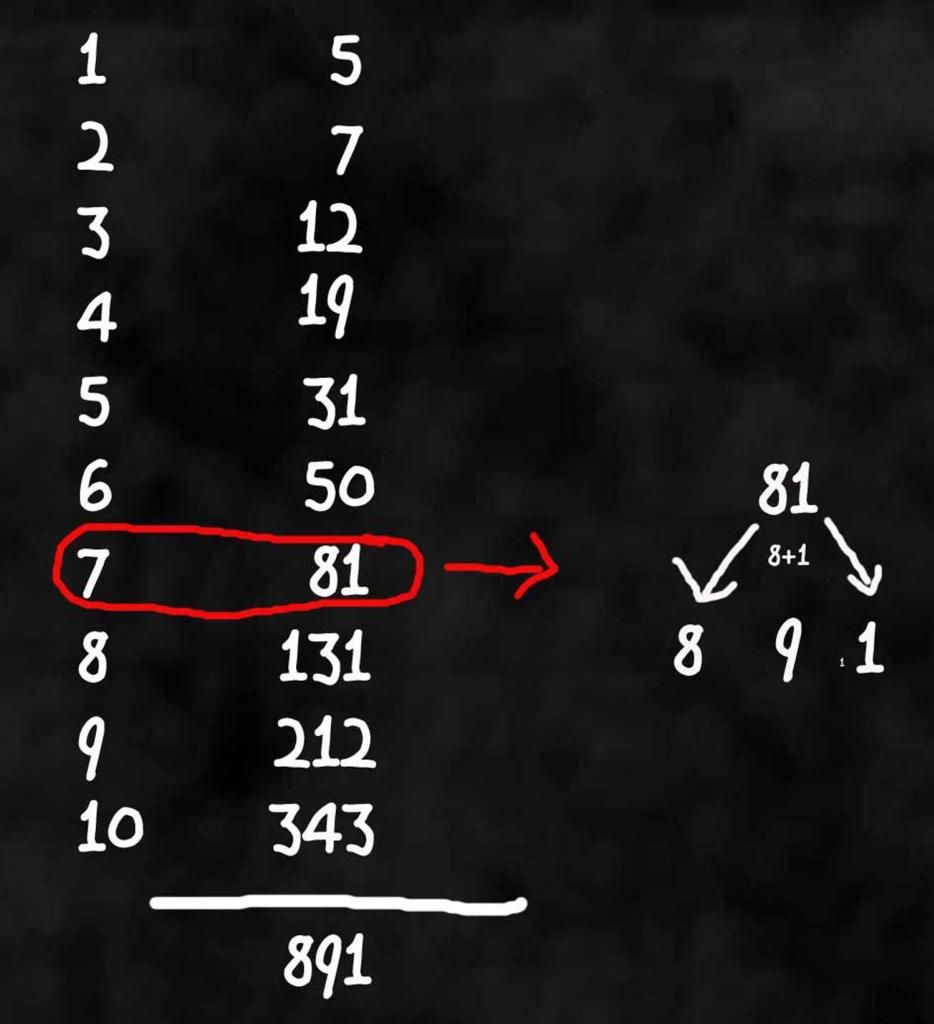
Have someone write down two 1-digit numbers on a piece of paper or chalk board, etc. and  add them together.  Then add the second number to the third and write down the sum.  Have them continue this process until they have 10 numbers.  Then ask them to add all ten numbers together--you can even give them a calculator.  You'll solve it in your head and in mere seconds!


The secret is to take the fourth number from the bottom and multiply it by 11.  (You can start solving the problem as soon as they've written it down). 

Now if you have older kids (or math geeks), try showing  them the magic trick and see if they can use algebra to explain why it works.  For this trick lets replace the first two numbers with X and Y...


One of my main goals as a teacher has been to show my son that learning can be fun.  That's not always easy where math is concerned, but why don't you see for yourself if a little magic can do the trick (pun intended).

This is a virtual fair so please check out what these other bloggers have to share about math, science and logic products.


Delight Directed Middle School Science?  by Susan @ Homeschooling Hearts & Minds
http://homeschoolheartandmind.blogspot.com/2013/01/delight-directed-middle-school-science.html

The Hardest Part of Math by Kristi @ The Potter's Hand Academy
http://www.thepottershandacademy.com/the-hardest-part-of-math/

A Tour Through Our Math and Science Life by Christy @ Unexpected Homeschool
http://unexpectedhomeschool.blogspot.com/2013/01/vcfmath.html

What Works for Us…Math by Piwi Mum @ Learning & Growing the Piwi Way
http://piwiprincess.blogspot.com/2013/01/what-works-for-usmath.html

Math Art – Geometry by Julie @ Highhill Education
http://highhillhomeschool.blogspot.com/2013/01/math-art-geometry.html

It's Math-magical by Missouri Mama @ Ozark Ramblings
http://oramblings.blogspot.com/2013/01/its-math-magical.html

Virtual Curriculum Fair: Fun and Games with Math by Tonia @ The Sunny Patch
http://thesunnypatch.blogspot.com/2013/01/virtual-curriculum-fair-fun-and-games.html

Discovering Patterns by Lisa @ The Golden Grasses
http://goldengrasses.blogspot.com/2013/01/discovering-patterns-how-to-teach-
math.html

Math for the Natural by Erin @ Delighting in His Richness
http://delightinginhisrichness.blogspot.com/2013/01/math-for-natural.html

Virtual Curriculum Fair~ Discovering Patterns by Karyn @ Teach Beside Me
http://www.teachbesideme.com/2013/01/virtual-curriculum-fair-discovering.html

Too Many Math Programs or Not by Linda B @ Homeschooling6
http://training6hearts4him.blogspot.com/2013/01/too-many-math-programs-or-not.html

Virtual Curriculum Fair:  Math and More!  by April @ Coffee, Cobwebs,
and Curriculum
http://coffeecobwebsandcurriculum.blogspot.com/2013/01/virtual-curriculum-fair-math-and-more.html

The post where I admit I was wrong by Kristen H. @ Sunrise to Sunset
http://sunrisetosunsethomeschool.com/2013/01/14/the-post-where-i-admit-i-was-wrong/

High School Math - Beyond the Textbook by TechWife @ A Playground of Words
http://playgroundofwords.blogspot.com/2013/01/high-school-math-beyond-textbook.html

Discovering a World of Logic and Order by Joelle @ Homeschooling for His Glory
http://homeschoolingforhisglory.blogspot.ca/2013/01/virtual-curriculum-fair-discovering.html

2013 Virtual Curriculum Fair- Discovering Patterns: Mathematics,
Logic, and Science by Leah C @ As We Walk Along the Road
http://courtneysix.blogspot.com/2013/01/2013-virtual-curriculum-fair.html

The Plans of Mice and Math (My Math in Focus review) by Chelli @ The
Planted Trees
http://theplantedtrees.blogspot.com/2013/01/virtual-curriculum-fair-2013-plans-of.html

Rightstart Math is right for us! by Leann  @ Montessori Tidbits
http://www.montessoritidbits.com/2013/01/rightstart-math-review-games.html

Our Favorite Homeschool Math Curriculums by Wendy @ Homeschooling Blessings
http://wendy-homeschoolingblessings.blogspot.com/2013/01/our-favorite-homeschool-math-curriculums.html


Related Posts Plugin for WordPress, Blogger...